User Management
On this page, you can find how to manage database users in the Cloud Console: create and delete users, assign permissions and reset passwords.
Table of contents
Users tab
The USERS TAB of the Database details page lists the users with their permissions in the format database:level, where the level is R (Read) or RW (Read/Write). The main Database user (set when the Database was created) has its own password reset: the Reset password icon on the details page, see Databases.
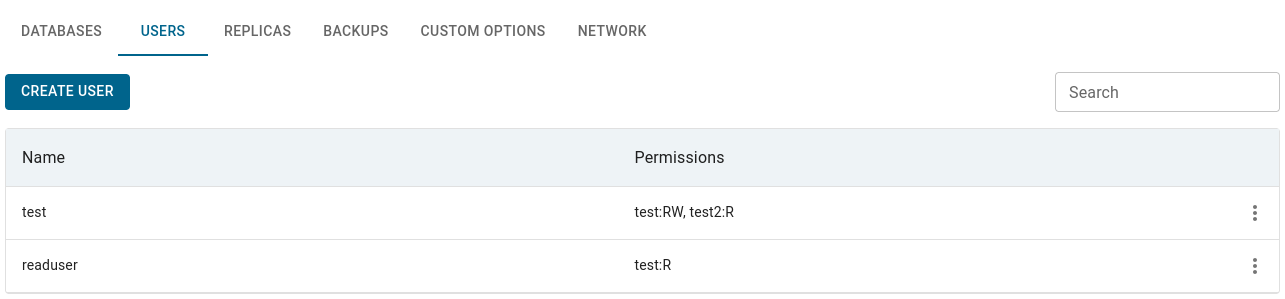
| Action | Description |
|---|---|
| CREATE USER | Username - starts with a Latin letter, Latin letters, digits and hyphens, does not end with a hyphen, up to 32 characters; system names (root, postgres, admin, default, replication, replicator, healthcheck) are reserved. Databases - the databases the user may access, with Read or Read/Write permission for each (Read/Write by default). The password is shown once after creation; if it is not available yet, a notification asks you to use Reset Password |
| Set Permissions (row Actions menu) | select or deselect databases and choose Read or Read/Write for each. A deselected database loses the access; saving with no databases removes all access of the user. Changes take effect immediately |
| Reset Password (row Actions menu) | confirm; the new password is shown once |
| Delete (row Actions menu) | type the name of the user to confirm |
A permission the engine refuses is not applied and is listed in the notice Permissions not applied on the details page.
Redis has no named databases and its access rules apply to the whole instance, so the create and permission forms ask for one Permission (Read or Read/Write) instead of a database list; the form says Access applies to the whole instance. Read/Write users cannot run administrative commands.
Users managed inside the database
For some Databases you create and manage databases, users and permissions yourself inside the database engine (for example with psql, mysql or Database management), and the platform runs no account commands there. This is typically the case for older Databases taken over from a previous platform version.
For such a Database:
- an information notice with the reason is shown at the top of the details page (together with the other notices, see Databases), for example Databases and users are read-only for this instance;
- the lists on the DATABASES TAB and the USERS TAB show what currently exists in the engine and are read-only: creating databases and users, Set Permissions, Reset Password, Delete and the Reset password icon are not available;
- everything else (resources, backups, High Availability, extensions) is managed by the platform as usual.